
Free Online Resume Builder – Create Your Professional CV in Minutes
Are you looking for a Free Resume Builder to create a professional CV/Resume? Our Free Online Resume Maker helps you to build a Professional Resumes in a minutes without any design skills.
Whether you are a fresh graduate, experienced professional, career changer or international job seeker, Start Building Your Perfect Resume Online Today.
Create Your Resume
Why Choose Our Free Resume Builder?
Creating a professional resume should not be complicated or expensive. So-Our Free CV Maker offers:
- 100% Free – No hidden charges – no credit card required.
- Save Time And Effort – You can make you resume with in a (15-20) minutes.
- Instant Download – Get your Resume in PDF format immediately.
- Mobile-Friendly – Build your CV on any device and anywhere.
- No Registration Required – Start creating your resume right away.
- Professional Formatting Without Designers – Clean, modern layouts that recruiters love.
How To Build Your Resume In Easy Steps
Creating your professional resume is simple with our Free Resume Builder. Follow these steps to create a beautiful and professional Resume/CV that gets you noticed by employers and high profile companies.
Step 1: Enter Your Basic Information
Start by providing your contact details and professional identity:
- Full Name – Your complete legal name as it appears on official documents.
- Contact Details – House number, area/locality and state/city- based on your location.
- Phone Number – Active mobile number where company/employers can contact you.
- Email Address – Professional email ID.
- Professional Role – Your current job title or desired position (E.g. Receptionist, Security Guard, Marketing Manager, Cashier, Driver).
Step 2: Craft Your Career Objective
Select your experience level and our builder automatically suggests tailored career objectives:
- Entry Level – Perfect for fresh graduates without any working experience.
- Mid-Level – Ideal for professionals with 1-3 years of experience.
- Senior Level – Designed for managers and leaders with 4-7 years of experience.
- Professional Level – It suites for executives and industry experts with 8+ years of experiences.
Your career objective is the first thing that company reads. Make it as clear and professional – which shows your goals, relevant skills and what value you bring to potential employers. Studies show that resumes with strong career objectives receive 40% more interview callbacks.
Step 3: Add Your Academic Qualification
List your educational background in reverse chronological order (most recent first) or chronological order – as you want:
- Degree/Qualification name (Bachelor’s, Master’s, PhD, Diploma and High School).
- University/Board or institution name.
- Graduation year.
- GPA or percentage (%).
Step 4: Include Other Qualifications
Showcase certifications, training programs and additional qualifications that make you stand out:
- Technical training programs (Basic Computer Courses).
- Online course completions (Online Language Learning).
- Industry-specific licenses.
- Workshops and seminars attended.
- Technical training programs.
- Professional certifications.
In 2026 – 87% of employers value continuous learning. Highlighting additional qualifications demonstrates your commitment to professional development on your job field and can increase your chances of landing interviews by 35%.
Step 5: Add Your Work Experience
This is the most important section of your resume. Include your job – some example as below:
- For Receptionist – Worked as a Receptionist at XYZ Pvt. Ltd. for 3 years. Responsible for managing front-desk operations, handling incoming calls, greeting visitors, scheduling appointments and maintaining records. Utilized strong communication, customer service and organizational skills on a daily basis.
- For Security Guard – Worked as a Security Guard at ABC Security Services for 5 years. Duties included monitoring premises, controlling access points, conducting regular patrols and ensuring the safety of staff and property. Applied vigilance, physical fitness and incident-reporting skills consistently.
- For Marketing Manager – Worked as a Marketing Manager at DEF Pvt. Ltd. for 6 years. Led marketing campaigns, developed strategies, managed teams, analyzed market trends and coordinated with sales departments. Utilized leadership, strategic planning, and communication data analysis skills.
- For Cashier – Worked as a Cashier at GHI Supermarket for 4 years. Handled cash transactions, processed payments, issued receipts, assisted customers and maintained accurate billing records. Used numerical accuracy, customer service and time-management skills daily.
- For Driver – Worked as a Driver at JKL Transport Company for 7 years. Responsible for safe transportation of goods/passengers, vehicle maintenance checks, route planning and timely deliveries. Applied safe driving practices, route knowledge and reliability.
Step 6: Complete Personal Information
Provide an additional details that give employers/company-a complete picture:
- Gender – Include based on an individual.
- Father Name – Required for certain industries and regions.
- Date Of Birth – Format consistently (MM/DD/YYYY).
- Languages Known – List all known languages.
- Nationality– Important for international applications and work permits.
- Marital Status – Optional in many countries, include if culturally relevant.
Step 7: Preview And Download Your Resume
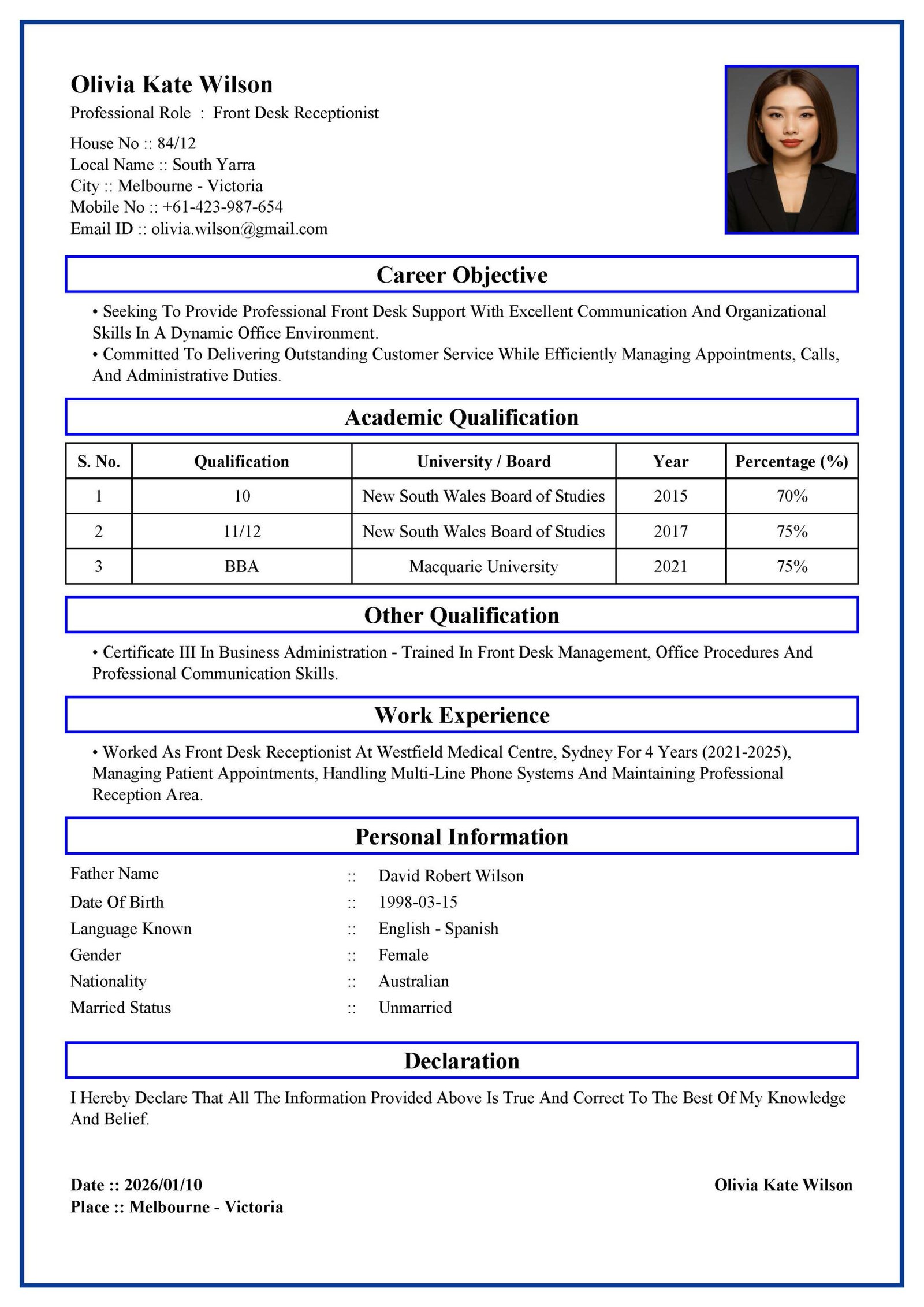
After completely filled all this necessary information then click the Create Resume button. You get your professional Resume/CV Preview with:
- Basic Information-With your detail information’s and Passport Size photo.
- Career Objective– As mentioned your goal, interest and vision.
- Academic Qualification – Properly mentioned all your academic qualifications in tabular forms.
- Other Qualification – Which shows your self-development and learning skilled in bulleted point.
- Work Experience – Your past works experiences in different fields.
- Personal Information – Presented professionally.
- Declaration – Your standard statement which affirming information accuracy of Resume/CV information.
Date/Place And Your Signature – Our CV Maker automatically mention the updated Resume/CV creation date And your permanent address – At right bottom corner you can also make a physical signature (after you download and print your Resume) before submitting copy of Resume/CV to the company/employer.
Review And Downad Your Resume/CV
Review your resume carefully, check for spelling errors and ensure consistency in formatting. Our preview feature shows exactly how your CV/Resume will appear to the employers.
Then Download and Print your professional Resume/CV-It looks beautiful if you print your Resume in color print format.